Laptops ranking
Best Lightweight Laptops
A good lightweight laptop should feel easy to carry without giving up keyboard comfort, screen quality, or all-day battery life.
Updated 2026-08-23
Scores are editorial estimates based on public product data and the published category weights; they are not lab measurements.
Quick picks
Jump straight to the right product for your situation.
Top pick
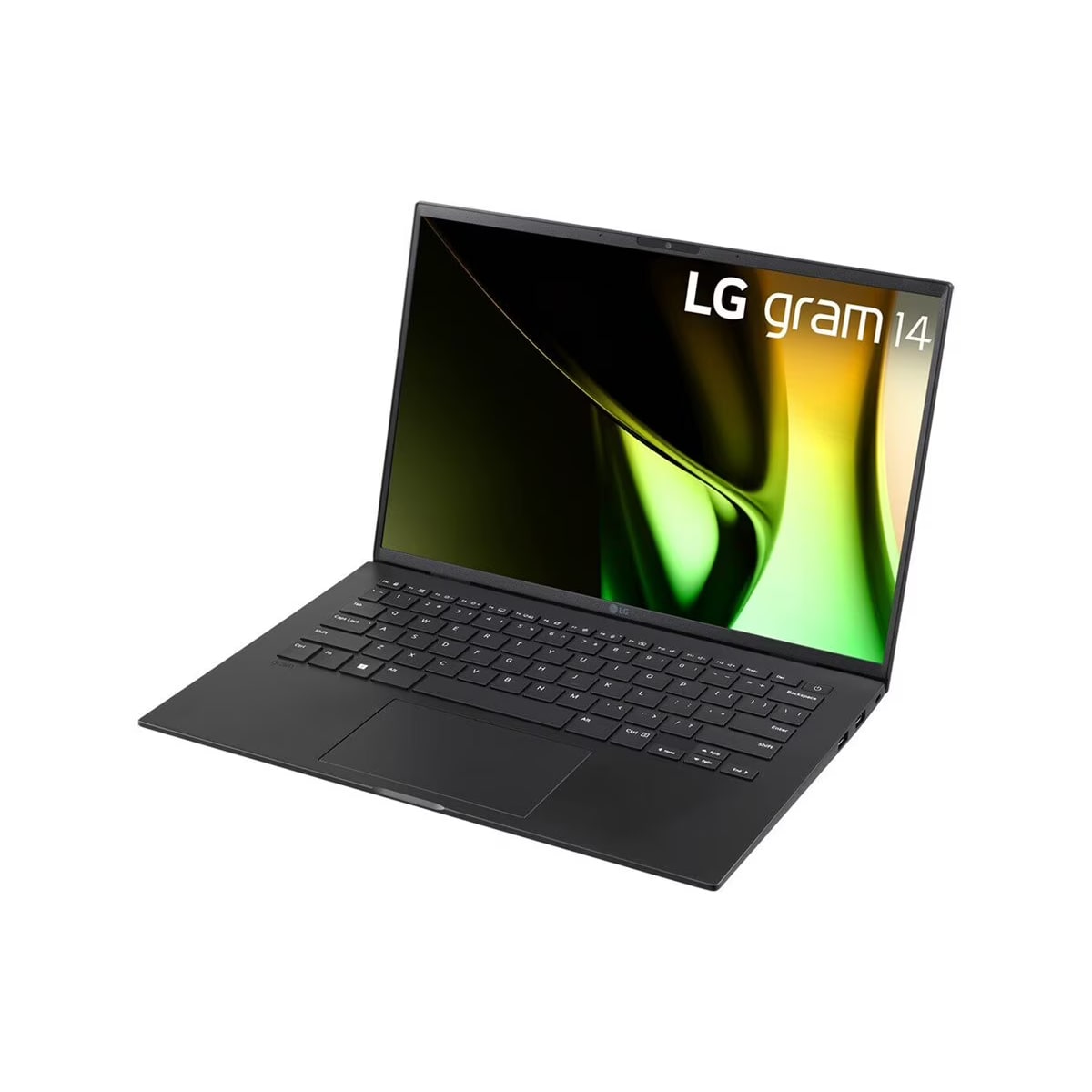
LG gram 14
LG gram 14 is best suited to ultra-light travel and long battery life. Compare alternatives if this documented drawback would undermine that fit: Display or speaker quality can feel average once you leave the desk.
- 1Editorial 8.4 / 10
LG gram 14
LG gram 14 is best suited to ultra-light travel and long battery life. Compare alternatives if this documented drawback would undermine that fit: Display or speaker quality can feel average once you leave the desk.
Why it ranks here
LG gram 14 belongs in this lightweight laptops list because Best for frequent travelers who want a very light laptop with a larger-than-tablet work surface. Its strongest fit is lightweight travel and office work, and the current editorial reference price is around $999.
Buyer note
Skip or compare it carefully if chassis feels less dense than premium rivals. Buyers should also check alternatives when ecosystem fit, discounts, or long-term ownership costs matter more.
Performance
7.8
Battery
9
Portability
9.5
- 2Editorial 8.8 / 10
MacBook Air 13-inch M3
Choose the 13-inch MacBook Air M3 for a light Apple laptop with a 13.6-inch display and up to 18 hours of rated movie playback. Skip it if you need more ports or dual external displays without closing the laptop lid.
Why it ranks here
MacBook Air M3 belongs in this lightweight laptops list because Best for students, writers, and remote workers who value battery life, silence, portability, and a polished everyday experience. Its strongest fit is students and writers, and the current editorial reference price is around $899.
Buyer note
Skip or compare it carefully if limited port selection. Buyers should also check alternatives when ecosystem fit, discounts, or long-term ownership costs matter more.
Performance
8.5
Battery
9.2
Portability
9.2
- 3Editorial 8.7 / 10
Microsoft Surface Laptop 7
Choose Surface Laptop 7 for a clean Windows ultraportable with a touch display and strong claimed battery life. Compare x86 alternatives if a specialized app, peripheral, or corporate tool has not been confirmed for the laptop's Windows-on-Arm environment.
Why it ranks here
Microsoft Surface Laptop 7 belongs in this lightweight laptops list because Best for Windows users who prioritize battery life, quiet operation, and Microsoft's clean hardware design. Its strongest fit is Windows productivity and battery life, and the current editorial reference price is around $899.
Buyer note
Skip or compare it carefully if app compatibility can matter for niche software. Buyers should also check alternatives when ecosystem fit, discounts, or long-term ownership costs matter more.
Performance
8.3
Battery
9.3
Portability
9
- Editorial 8.54
Dell XPS 13
Dell XPS 13 is best suited to compact premium Windows and travel productivity. Compare alternatives if this documented drawback would undermine that fit: RAM or storage upgrades are limited on several thin models.
Why it ranks here
Dell XPS 13 belongs in this lightweight laptops list because Best for Windows users who want a compact premium laptop and are comfortable with a minimalist port layout. Its strongest fit is Windows portability and business travel, and the current editorial reference price is around $1,099.
Buyer note
Skip or compare it carefully if port selection is minimal. Buyers should also check alternatives when ecosystem fit, discounts, or long-term ownership costs matter more.
- Editorial 8.65
Lenovo ThinkPad X1 Carbon Gen 13
Lenovo ThinkPad X1 Carbon Gen 13 is best suited to business ultraportable and writers and executives. Compare alternatives if this documented drawback would undermine that fit: Chassis build is practical rather than premium under daily travel abuse.
Why it ranks here
Lenovo ThinkPad X1 Carbon Gen 13 belongs in this lightweight laptops list because Best for business travelers who care about keyboard quality, serviceability, ports, and a light chassis. Its strongest fit is business travel and keyboard quality, and the current editorial reference price is around $1,599.
Buyer note
Skip or compare it carefully if premium pricing. Buyers should also check alternatives when ecosystem fit, discounts, or long-term ownership costs matter more.
- Editorial 8.56
ASUS Zenbook 14 OLED
ASUS Zenbook 14 OLED is best suited to OLED ultraportable and students and professionals. Compare alternatives if this documented drawback would undermine that fit: Display or speaker quality can feel average once you leave the desk.
Why it ranks here
ASUS Zenbook 14 OLED belongs in this lightweight laptops list because Best for students and office users who want an OLED laptop without paying premium flagship prices. Its strongest fit is OLED value and students, and the current editorial reference price is around $849.
Buyer note
Skip or compare it carefully if speakers and webcam are not class-leading. Buyers should also check alternatives when ecosystem fit, discounts, or long-term ownership costs matter more.
Buying guide
Who this ranking is for
This ranking is built for North America shoppers who already know the category they want but still need a short, practical shortlist. The goal is not to reward the longest spec sheet. It is to identify which laptop is easiest to recommend for this search intent after balancing performance, memory, battery life, keyboard comfort, display quality, weight, ports, and warranty support. Start with LG gram 14 if you want the safest top pick, then compare MacBook Air M3 and Microsoft Surface Laptop 7 when price, ecosystem fit, or one specific weakness could change the decision.
How to read the order
The order is editorial rather than a pure score sort. A product can rank higher because it solves the exact buying problem better, even if another model has a stronger single spec. For example, LG gram 14 is placed near the top because Best for frequent travelers who want a very light laptop with a larger-than-tablet work surface. MacBook Air M3 is still worth comparing because Best for students, writers, and remote workers who value battery life, silence, portability, and a polished everyday experience. The buyer notes below call out the biggest reason to buy each product and the most important drawback to check before you commit.
Budget and value notes
Use current US reference pricing as a starting point, not as a live deal tracker. In this set, ASUS Zenbook 14 OLED is the easiest value anchor at about $849, while Lenovo ThinkPad X1 Carbon Gen 13 sits near the premium end at about $1,599. Paying more makes sense only when the extra money changes daily ownership: longer support, better comfort, stronger gaming performance, a better camera, or fewer compromises. If two picks are close in price, choose the one with the better ecosystem fit and fewer deal-breaking cons.
When to buy or wait
Buy from this shortlist when the chosen product fixes a current limitation and its checkout price still supports the value case described above. Wait when LG gram 14 is close to launch pricing, a replacement is imminent, or MacBook Air 13-inch M3 covers the same job for less. Use the linked comparisons to test the final two candidates before committing.
How we picked
- We start with performance, battery life, portability, display quality, keyboard comfort, and value, then adjust the order for the specific lightweight laptops buying intent.
- US street pricing, official availability, common retailer discounts, and realistic upgrade timing matter more than launch hype.
- Every pick must solve a real North America shopping problem and have clear reasons to buy, skip, or compare against another laptop.
- We favor products with enough long-term support, ecosystem fit, warranty clarity, and alternatives to avoid isolated recommendations.
Budget advice
For laptops, the best budget move is usually stepping up for memory, battery life, a better keyboard, or a better display instead of chasing the fastest chip on paper. In this lightweight laptops list, the best value is the product that fits the job without forcing a costly upgrade elsewhere.
Buying timing
Laptop deals are strongest around back-to-school season, Black Friday, and model refreshes. Buy now for school or work deadlines; wait if the current price is close to launch pricing. Use the related comparisons before paying extra for a neighboring model in this lightweight laptops category.
Product sources and verification
Ranking order is editorial. The links below support identified product specification fields; unbadged data, current prices, configurations, and regional availability still require a checkout-time check.
- Apple MacBook Air (13-inch, M3, 2024) technical specifications · MacBook Air 13-inch M3 · accessed 2026-07-30
- Microsoft Copilot+ PC launch announcement · Microsoft Surface Laptop 7 · accessed 2026-07-29
- Dell XPS 13 9350 configuration specifications · Dell XPS 13 · accessed 2026-07-29
- Lenovo PSREF ThinkPad X1 Carbon Gen 13 Aura Edition · Lenovo ThinkPad X1 Carbon Gen 13 · accessed 2026-07-29
- ASUS Zenbook 14 (UX3405) - Tech Specs · ASUS Zenbook 14 OLED · accessed 2026-07-29
FAQ
How should I choose from Best Lightweight Laptops?
Start with the first product that matches your use case, budget, and ecosystem. Then use the buyer notes and related comparisons to rule out picks with trade-offs that matter to you.
Should I wait for a sale before buying a laptop?
Wait if your current setup still works and the product is near launch price. Buy sooner when the recommendation solves a real daily problem or when a discount already puts it below close alternatives.
Why are some higher-scoring products ranked lower?
The order is editorial. Scores help compare specs, but rankings also consider price, availability, buyer fit, ecosystem lock-in, and whether the product is the right answer for this specific search intent.
Related comparisons
MacBook Air M3 vs Microsoft Surface Laptop 7: Which Should You Buy?
MacBook Air 13-inch M3 vs Microsoft Surface Laptop 7: compare performance, battery, display, ports, price, and US/Canada availability.
MacBook Air M3 vs Dell XPS 13: Which Should You Buy?
Compare MacBook Air M3 and Dell XPS 13 by portable performance, battery life, keyboard quality, display type, ports, RAM, storage, and operating-system.
ASUS ROG Zephyrus G14 vs Razer Blade 14: Which Should You Buy?
Compare Zephyrus G14 and Razer Blade 14 by exact GPU and memory configuration, display, battery, portability, inputs, and total price.
Related guides
How Much RAM Do You Need in a Laptop?
A practical laptop RAM guide for students, office work, programming, creative workloads, browser tabs, and long-term value.
OLED vs IPS Laptop Displays
OLED vs IPS Laptop Displays for North America shoppers, with practical links to products, rankings, comparisons, and category pages.